
Remote access · Data logging · Monitoring Access your machines and controllers remotely. Collect measurement data and manage connections and access rights centrally. Find the router in our ServiceGate range that fits your installation. All models support remote access, data logging and monitoring. Choose by interfaces, internet connection and application. Configure data logging centrally through the Remote Portal, not through the router’s local interface. Remote access and monitoring Management via the Remote Portal Customization and support Since 2008 Connect to your PLC, HMI, or machine in a controlled manner via an industrial VPN router. Use the appropriate engineering software to investigate a fault or check a setting as if you were standing right next to it. All ServiceGate routers support datalogging. You manage its configuration centrally in the Remote Portal, not in the router’s local interface. You select the protocol and the data you want to retrieve or receive. The portal sends the configuration to the router, which then collects the data and automatically forwards it to the configured service. Templates let you reuse settings across multiple routers. You manage datalogging for your sites in one central place, without rebuilding similar configurations each time. Adapt the measurement points and protocols to each installation. Monitoring makes the collected data useful through dashboards, alarms and events.Industrial routers for remote access and data logging
One connection for service and insight
Five versions
Which industrial router fits your installation?
All five give you access and insight. The differences are in the hardware and configuration.
The differences at a glance
Compare the five ServiceGate routers
Remote access and datalogging capabilities are present in every model. Focus primarily on your connections, mounting, and desired connection type.
On a narrow screen: slide the table to the left to compare all models.
| Feature |  ServiceGate V3 ServiceGate V3 |  ServiceGate Nano V3 ServiceGate Nano V3 |  ServiceGate Pico 4G ServiceGate Pico 4G | 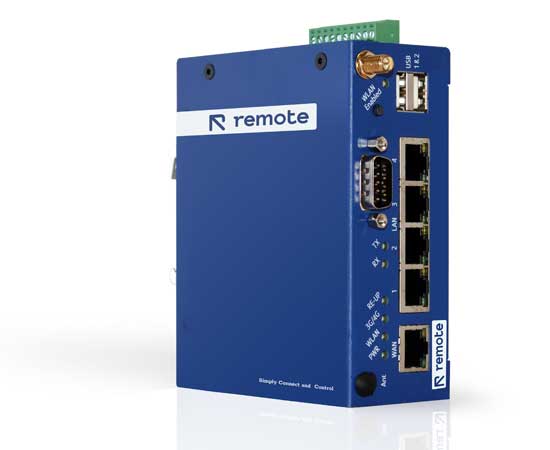 ServiceGate V2.5 ServiceGate V2.5 | 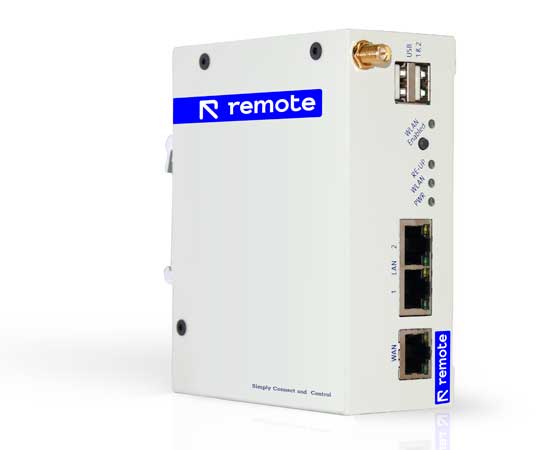 ServiceGate V2.5 Lite ServiceGate V2.5 Lite |
|---|---|---|---|---|---|
| Best suited for | Multiple directly connected network devices | Compact installation with 4G and serial link | Small mounting space and one direct LAN connection | Several network devices, GPIO and a serial connection | Two direct LAN connections, or more devices via a switch |
| Internet connection | Ethernet, Wi-Fi; 4G/LTE optional | Ethernet, Wi-Fi, and standard 4G/LTE | Ethernet, Wi-Fi, and standard 4G/LTE | Ethernet, Wi-Fi; 4G/LTE optional | Ethernet, Wi-Fi; 4G/LTE optional |
| LAN ports | 4 LAN + 1 WAN | 1 LAN + 1 configurable WAN/LAN* | 1 LAN + 1 WAN | 4 LAN + 1 WAN | 2 LAN + 1 WAN |
| GPIO / I/O | 8 GPIO connections | I/O present; 3.3V signal level. Pin assignment to be coordinated* | GPIO specification on request* | 8 GPIO connections | I/O options to be agreed* |
| Serial connection | Discuss your serial link | RS485; confirm desired version* | RS485 according to product specification* | RS-232/422/485 (DB9) | Serial connection on request* |
| Remote access via VPN | Yes | Yes | Yes | Yes | Yes |
| Datalogging / monitoring / IoT | Yes; custom readout and setup | Yes; custom readout and setup | Yes; custom readout and setup | Yes; custom readout and setup | Yes; custom readout and setup |
| Mounting / housing | DIN rail, IP30 / NEMA Class 1 | DIN rail, metal housing | DIN rail, aluminum housing | DIN rail, metal IP30 housing | DIN rail, metal IP30 housing |
| Dimensions (L × W × H) | 100 × 100 × 40 mm | 97 × 112 × 24 mm | 100 × 63 × 31 mm | 121 × 98 × 46 mm | 121 × 98 × 46 mm |
On a narrow screen, you can slide the table horizontally.
* Coordinate the exact port layout, serial version, and I/O connections with us. GPIO signals are not inherently suitable for direct connection to industrial voltages or loads.
Three questions to move you forward
Choose based on your application, not a model name
QUESTION 01
Is internet available, or do you want 4G?
Can you use the existing wired or wireless network? Include the agreed network requirements. For a mobile connection, Nano V3 and Pico include 4G/LTE as standard; it is optional on V3, V2.5 and V2.5 Lite.
QUESTION 02
How many devices do you want to connect?
V3 and V2.5 have four LAN ports for several directly connected devices. V2.5 Lite has two LAN ports. Consider Nano V3 or Pico for a compact installation. For additional devices, we determine together whether a switch and network segmentation are needed.
QUESTION 03
What data do you want to collect and track?
List your readings, protocols, required measurement frequency and alerts. All five routers support data logging and monitoring. This determines the configuration, not whether your router can log data.
Manage access to every installation
The ServiceGate establishes an encrypted VPN connection. In the Remote Portal, you manage assets and user rights. This is how you set up who gets access to which installation.
Security-by-design is also about network agreements, appropriate rights, and management. We help you think about the setup that fits your OT environment.
A proprietary protocol or data platform? Certainly.
Not every installation fits a standard link. Our team helps with protocol integration, a custom data link, or a specific setup for your machines.
Do you also want to run your own applications or local control logic? Then compare our Edge and Smart Controllers.
Frequently asked questions about industrial VPN routers
Secure access starts with the right configuration.
Use your ServiceGate to create a dedicated machine segment and define who may access each control system. We tailor the firewall profile and any internet access behind the router to the customer or site. Segmentation does not replace security updates for the machine.
