
OpenPLC on Industrial Controllers: Configuration & Hardware
Last updated on 30 April 2026
This manual explains how to use OpenPLC to build and test PLC programs and control industrial hardware. OpenPLC is an open-source platform that supports IEC 61131-3 and enables programming languages such as Ladder Diagram (LD), Structured Text (ST), and Function Block Diagram (FBD). Remote provides the Edge Controller with an integrated OpenPLC environment, allowing engineers and developers to quickly realize prototypes and smart control systems.
What is OpenPLC?
OpenPLC is an open-source platform designed to make programmable logic controllers (PLCs) accessible. Thanks to the support of IEC 61131-3, you can choose from multiple programming languages (LD, ST, FBD) and import existing PLC projects more easily. OpenPLC is suitable for industrial processes, education and proof-of-concepts.
OpenPLC vs. Raspberry Pi PLC
While OpenPLC is often seen on a Raspberry Pi, it lacks the necessary robustness for professional applications. Our controllers offer you the perfect OpenPLC hardware solution:
- Industrial I/O: Direct control of your 24V sensors and actuators.
- Security: Fully integrated with our Zero Trust Remote Portal.
- Reliability: No SD cards that fail, but industrial flash memory instead.
Step-by-step guide: Configuring the OpenPLC Web Interface
Our controllers have a built-in web interface that you can use immediately. Follow these steps:
- Connect: Connect your PC to the LAN port of the controller.
- IP Address: Open your browser and go to the default IP address 10.195.0.1.
- Login: Use your login credentials and navigate to the OpenPLC section in the menu.
- OpenPLC Editor: Write your program in the free editor and simply upload the .st file via the web interface. You use the OpenPLC Editor to write PLC programs in LD, ST, or FBD.
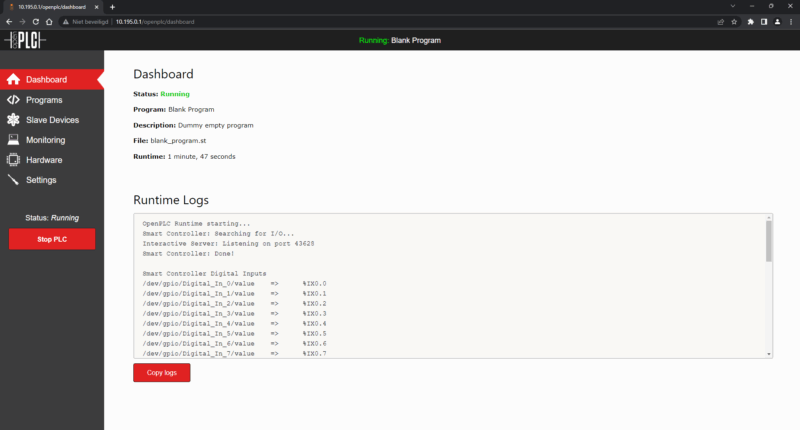
Monitor Inputs and Outputs in Real Time
Once loaded, the active PLC program can communicate directly with the physical inputs and outputs of the controller. You can read and control inputs and outputs in real time via the web interface. This means that sensors, switches and actuators are visible and testable from OpenPLC, so you can immediately validate the programmatic logic on the connected hardware.
Communication: Modbus, DNP3, and EtherNet/IP
Your OpenPLC environment on the controller acts as the central hub in your network. It supports industrial communication via built-in servers for, among others:
- Modbus TCP/RTU: For simple data collection (for information on data collection and monitoring, see also Modbus).
- DNP3 & EtherNet/IP: For seamless integration into your existing SCADA systems.
- OPC UA & MQTT: Optionally configurable for your IoT applications.
This allows the active program to be monitored and influenced via standard protocols, simplifying integration with other systems.
Flexibility and Application Possibilities
The combination of OpenPLC and the controller offers flexibility: you choose the programming language that suits your project, import existing PLC projects and easily implement adjustments. This makes the solution suitable for industrial applications, research and training. Engineers can quickly work on prototypes, troubleshoot and perform repeatable tests on the hardware.
Management and Practical Tips
Work systematically: version management of PLC programs in the OpenPLC Editor, clear naming of I/O tags and documenting IP addresses and login details (username/password) help prevent problems. First test functions by monitoring inputs and outputs locally before activating integration with other systems.
A Future-Oriented Solution without Complexity
By using OpenPLC on the controller, a user-friendly environment for control solutions is created. You develop and test programs directly via the web interface, monitor your real-time I/O and control hardware without complicated setup. Thanks to support for Modbus, DNP3 and Ethernet/IP, you can easily connect and expand existing automation systems.
OpenPLC Frequently Asked Questions (FAQ)
In this article
- What is OpenPLC?
- OpenPLC vs. Raspberry Pi PLC
- Step-by-step guide: Configuring the OpenPLC Web Interface
- Monitor Inputs and Outputs in Real Time
- Communication: Modbus, DNP3, and EtherNet/IP
- Flexibility and Application Possibilities
- Management and Practical Tips
- A Future-Oriented Solution without Complexity
- OpenPLC Frequently Asked Questions (FAQ)

